Less manual entry
Move parts, properties and quantities into your ERP, with a chance to review changes before you submit.
Move parts, properties and BOMs between your engineering and ERP systems. Review the data before sending changes.
Built and supported by CADSharp. Assisted implementation is included in annual plans.
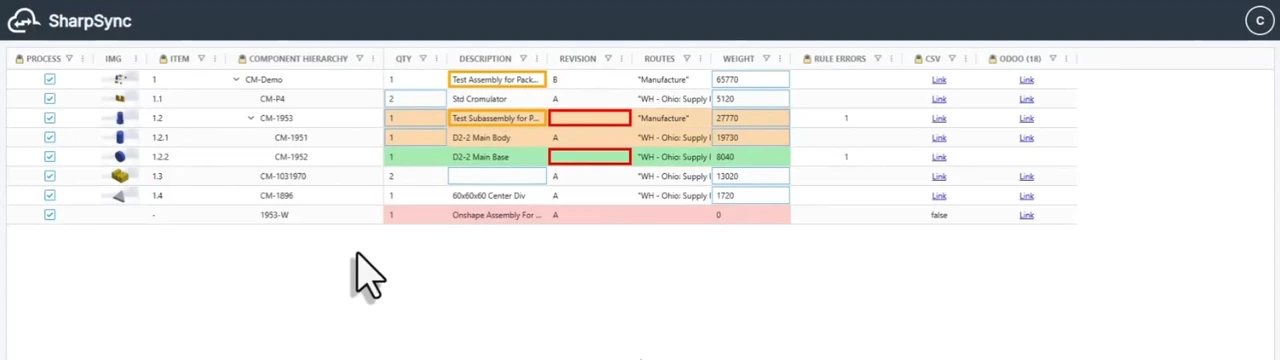
Move parts, properties and quantities into your ERP, with a chance to review changes before you submit.
Connect more systems through the same cloud engine and interface, keeping your team in a familiar workflow.
Process BOMs on our servers and receive improvements through centrally delivered platform updates.
Work directly with CADSharp, with assisted implementation and technical support included in your annual plan.
Start with one of these integrations, or explore the full range of systems.
Bring Onshape part properties and assembly BOMs into your NetSuite workflow.
Explore this integrationMap Onshape parts and assembly BOMs to the products and BOMs your Odoo team works with.
Explore this integrationConnect your PDM BOM workflow with the items and BOMs your NetSuite team needs.
Explore this integrationAnnual plans from 6,000 USDOne user · Assisted implementation · Technical support
We can connect your system to the SharpSync cloud platform.
Sandbox access required. Initial development usually quoted separately.
Connect your CAD/PDM and ERP systems with your administrators.
Set property mappings and review the BOM before sending changes.
Submit the selected changes and check the result in your ERP.
A useful evaluation includes engineering, your ERP administrator and the right IT support.
Review software editions and versions, API access, BOM types, revisions and any drawings or other files you need to transfer.
Agree part identifiers and property mappings. Test new and existing items and a representative assembly change before rolling out.
CADSharp helps with SharpSync implementation. Your team provides access, approves the mapping and validates the business result.
Using SOLIDWORKS PDM? Bring IT into the evaluation early. The documented setup requires an IT-approved Web2 API connection over HTTPS.
Tell us which platforms you use, how you move BOMs today and what you need to improve.
What happens next
CADSharp reviews your systems and workflow, then discusses compatibility, scope and a suitable next step. No CAD files are needed for this inquiry.


